Moadra demo: Download, Save Transfer, and PC Guide
Download the Moadra demo on Steam, learn how saves and achievements transfer, check PC requirements, and see what changed in the latest update.
Moadra Demo at a Glance: Try Before You Commit
The Moadra demo gives you a way to test Gloomsoft’s dark sci-fi Metroidvania before buying the full game. That matters because its alien exploration, demanding combat, and progression systems may appeal very differently to different players. Better still, the updated Moadra demo supports save progress that carries into the full release, so trying it does not have to mean starting over later.
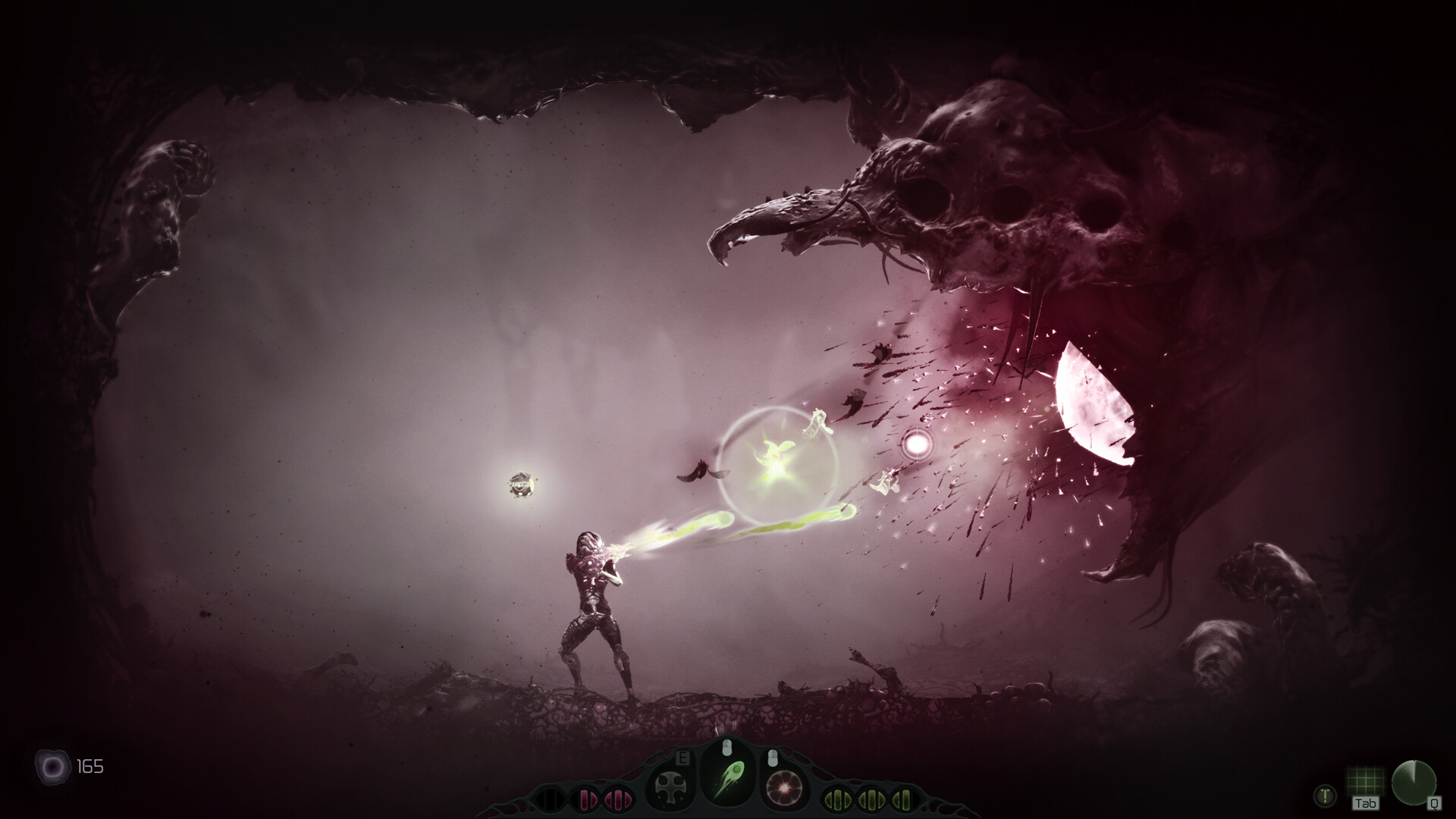
Official screenshot · Source: Steam store
As of October 23, 2026, the demo remains listed on Steam following the full game’s October 22 launch. The most useful details are straightforward: where to download it, what the recent update adds, and how its saves and achievements work.
| Question | Confirmed information |
|---|---|
| Where is the demo available? | On Moadra’s Steam store page |
| Who develops and publishes Moadra? | Gloomsoft |
| Has the full game launched? | Yes, on October 22, 2026 |
| Does demo progress transfer? | Yes, according to the developer’s October 21 update |
| What happens to demo achievements? | They are saved locally and unlock after buying and launching the full game |
| Is Moadra Steam Deck Verified? | Yes; the main game’s Steam listing displays Verified status |
One important distinction: the official material describes the full game’s mechanics, but it does not specify exactly how much content the demo includes. There is no confirmed demo completion time, endpoint, or complete list of available upgrades in the supplied announcements.
Treat it as a chance to judge the experience, not as a preview with a guaranteed number of hours.
How to Download the Moadra Demo on Steam
Start with the official Moadra Steam store page. It lists a dedicated demo download option separately from the full-game purchase section.
This distinction matters because the store currently displays both the demo and a paid edition. You want the demo download control if your goal is to try the game before making a purchase.
| Step | What to do | What to check |
|---|---|---|
| 1 | Open Moadra’s official Steam listing | Confirm the developer is Gloomsoft |
| 2 | Find the “Download Moadra Demo” section | Use the demo option rather than the purchase button |
| 3 | Follow Steam’s installation prompts | Check the destination drive and available storage |
| 4 | Launch the installed demo | Review controls and settings before beginning |
| 5 | Keep the installation updated | The October 21 update includes important progression features |
If you are browsing in a web browser, Steam may prompt you to open its desktop client. Follow the client’s installation instructions rather than looking for a separate installer on an unofficial download site.
Do you need to buy the full game first?
The Steam listing presents the Moadra demo as a separate download, so purchasing the full game is not the route you need to take to access the trial.
For anyone considering an upgrade afterward, the US-dollar prices shown in the reference listing are:
- Standard full-game price: $24.99.
- Introductory price: $22.49, a 10% discount.
- Listed offer end date: November 5, 2026.
Those are full-game prices, not demo charges. Regional pricing and later promotions can differ, so confirm the amount displayed in your own Steam store before buying.
Before your first session, check control bindings and text readability. A few minutes spent adjusting the setup will make it easier to evaluate combat and exploration fairly.
Save Transfer, Achievements, and the Latest Demo Update
The October 21 developer announcement makes the updated demo particularly useful for prospective buyers. Gloomsoft confirmed localization improvements, rebindable controls, a scan logbook, and save progress that carries over to the full game.
These are practical changes rather than just presentation upgrades. Custom bindings let you adjust an action-heavy game to your preferred layout, while progress transfer reduces the cost of experimenting before purchase.
| Updated feature | What the developer confirmed | Why it matters |
|---|---|---|
| Localization | The demo received localization improvements | More players can evaluate the game in a supported language |
| Rebindable controls | Control rebinding was added to the updated demo | You can adjust inputs to suit your preferences |
| Scan logbook | The demo now includes a scan logbook | Scanning has a dedicated reference feature |
| Save transfer | Demo progress carries into the full game | You can continue rather than automatically restart |
| Achievement handling | Demo achievements are stored locally | They unlock on Steam after the full game is purchased and launched |
How does demo save transfer work?
The confirmed point is that Moadra demo progress carries over to the full game. However, the announcement does not provide a manual migration procedure, save-file location, or cross-device transfer instructions.
The sensible approach is to keep your existing demo save data intact when upgrading. Do not delete local saves or assume that copying files between computers is necessary.
If the full release does not recognize your progress, check current developer announcements before modifying save files. The available information does not establish a troubleshooting process, so specific folder paths or file-renaming instructions would be guesswork.
When do achievements unlock?
Demo achievements are recorded locally rather than immediately awarded to your Steam account. According to Gloomsoft, they unlock after you purchase and launch the full game.
That distinction prevents a common misunderstanding: an achievement earned during the demo may not appear on your Steam profile yet. The announcement explicitly describes delayed unlocking.
Because local storage is involved, preserving your demo data is a sensible precaution. The source does not confirm that demo achievement records synchronize across devices.
What to Evaluate During Your First Session
Moadra takes place on Protea VI, an alien planet filled with hostile creatures, environmental dangers, and mysteries tied to the protagonist’s Neera heritage. Its broader design centers on interconnected exploration, combat, puzzles, and evolving abilities.
The Moadra demo is most useful when you approach it with specific questions. Do you enjoy the movement? Does searching for routes feel rewarding? Are repeated combat attempts motivating or frustrating?
The official description outlines the following full-game systems. Not every ability or environment is confirmed to appear in the demo.
| System | Officially described design | What to evaluate if encountered |
|---|---|---|
| Movement | Rolling, dodging, jumping, wall jumping, and sprinting | Whether movement feels precise with your chosen controls |
| Combat | Weapons and special abilities against varied alien threats | Whether aiming, evasion, and resource use feel satisfying |
| Scanning | A scanner bot and X-ray vision reveal information and hidden routes | Whether investigating the environment feels rewarding |
| Evolution | Protoplasm is consumed in organic chambers to improve abilities and weapons | Whether progression choices are understandable |
| Exploration | An interconnected world with puzzles, secrets, and concealed paths | Whether you enjoy navigation and revisiting areas |
Test movement before judging difficulty
Spend a little time learning the available movement options in a relatively safe space. In an action platformer, unfamiliar controls can make an encounter feel harder than it otherwise would.
If a binding feels awkward, use the rebinding feature rather than repeatedly fighting your layout. Change one or two inputs at a time so you can tell whether the adjustment helps.
For a useful comparison, repeat a short stretch after changing your setup. Ask whether mistakes now come from timing and decisions rather than reaching for the wrong button.
Investigate instead of rushing
The official design emphasizes scanning, hidden paths, and environmental inspection. If those tools become available during your session, try using them deliberately rather than treating the game solely as a shooter.
A useful evaluation checklist is:
- Can you distinguish explored routes from places you still want to investigate?
- Do environmental clues make you curious?
- Does checking for secrets feel worthwhile?
- Are the available upgrade explanations clear?
- Do you want to continue after a difficult encounter?
These questions tell you more about personal fit than simply reaching the demo’s endpoint.
Put community feedback in context
Early community reports include praise for atmosphere, movement, and exploration. Other player experiences describe difficult bosses, weapon-energy frustrations, and situations players believed had trapped their progression.
Those accounts concern the launch-period game and should not be treated as confirmed demo defects. In particular, a player describing a “softlock” does not independently establish whether the cause is a bug, a missed route, or an overlooked mechanic.
They do offer useful things to watch for. During your own trial, notice whether you understand where to go, how to manage available resources, and what a failed fight teaches you.
Moadra also carries a developer warning for frequent violence and gore. Its alien setting is not intended to be a gentle, all-ages exploration experience.
PC Requirements and Steam Deck Considerations
The Steam page lists Windows requirements for Moadra, including DirectX 12 and a 64-bit operating system. These are the published full-game requirements, not a separately documented demo specification.
Use them as a compatibility reference, but do not assume the full game’s listed storage requirement equals the demo’s actual download size.
| Component | Minimum | Recommended |
|---|---|---|
| Operating system | Windows 10 or Windows 11, 64-bit | Windows 10 or Windows 11, 64-bit |
| Processor | Quad-core processor | Intel Core i3-8100 or similar |
| Memory | 4 GB RAM | 8 GB RAM |
| Graphics | NVIDIA GeForce GTX 900 series or similar | NVIDIA GeForce GTX 970 4GB or similar |
| DirectX | Version 12 | Version 12 |
| Available storage | 9 GB | 9 GB |
The minimum GPU description covers a broad product family, so it should not be read as a precise performance guarantee. Likewise, the listing does not provide resolution-specific frame-rate targets.
The Moadra demo offers a practical opportunity to check performance on your own system. Look for consistent responsiveness during movement and combat, not just a smooth-looking opening screen.
What about Steam Deck?
Moadra’s main Steam listing displays Steam Deck Verified status, and Gloomsoft highlighted that milestone in its October 21 announcement alongside the demo update.
That is encouraging for handheld players, but the supplied information does not give separate demo benchmark results, battery-life measurements, or a guaranteed frame rate. Check your installed demo directly for text readability, comfortable controls, and stable performance.
For prospective buyers, that hands-on check is more useful than assuming desktop requirements predict the exact handheld experience.
Moadra Demo FAQ
Is the Moadra demo still available after release?
Yes. As of October 23, 2026, the Steam store page lists a demo download even though the full game launched on October 22. Availability can change, so check the current store listing before planning a session.
Does Moadra demo progress carry over to the full game?
Yes. Gloomsoft’s October 21 update confirms save-progress transfer. It also states that demo achievements are saved locally and unlock on your Steam account after you purchase and launch the full game.
How long does the demo take to finish?
The supplied official material does not confirm a completion time or exact content boundary. Avoid treating player playtime figures from full-game reviews as demo-length estimates. Exploration habits and repeated combat attempts could also affect an individual session.
Is the demo worth trying before buying?
It is a useful first step if you enjoy sci-fi Metroidvanias but want to assess the controls, navigation, atmosphere, or difficulty yourself. Save transfer makes that trial more appealing: if you decide to continue, the developer confirms that your progress can follow you into the full release.
Related Guides
Moadra demo gameplay: Combat, Exploration, and Tips
Explore Moadra demo gameplay, learn what Steam confirms, and get practical tips for combat, exploration, upgrades, and checking performance.
Moadra full demo playthrough: Guide and Tips
Plan your Moadra full demo playthrough with exploration tips, combat advice, updated demo features, and details on save transfers.
Moadra price: Steam Launch Deal and Buying Guide
Check the Moadra price, Steam's $22.49 launch offer, its November 5 deadline, Xbox availability, and free demo details before buying.
Moadra Steam: Price, Demo, and Steam Deck Guide
Explore Moadra Steam pricing, demo save transfers, Steam Deck support, PC requirements, and launch feedback before buying.
Moadra demo boss: Combat Tips and Prep Guide
Prepare for the Moadra demo boss with practical combat tips, upgrade priorities, and a retry checklist, plus clear limits on confirmed encounter details.